An uptime check can tell you that a URL answered. It cannot tell you that a price table still shows the right plan, that a signup form reached the expected step or that a localized page kept its heading. The browser has to render the expected page before someone can review it.
RenderLog stores that state as a Check Suite scenario. A run can start from the dashboard, API, CI, webhook or schedule. Its result keeps the artifact, page details, assertions, visual comparison and review decision together.
Start with one page and one decision
For example, a public pricing page may show a Growth plan at $49 and a 'Start free trial' button. A useful check records the page and viewport, asserts that 'Growth' and '$49' are present, and captures the layout. If a release removes the plan or moves the button, the run tells a reviewer what needs attention. The amounts are illustrative, not RenderLog pricing.
Choose one page state that someone already checks by hand. In the scenario editor set the URL, target, viewport and only the flow steps needed to reach it. Add an assertion for visible text, a value, an attribute or a checked state. Add a visual baseline when layout is part of the decision.
Keep the setup that makes a run comparable
A URL is not enough when a cookie, locale, viewport, selector or flow step changes the result. A Check Suite stores scenarios and shared browser defaults; a scenario can define its input, target, viewports, flow, assertions and baseline. Later runs use the same saved settings.
Run it manually while tuning the scenario. After a release, start the same check from CI, API or webhook. Use a schedule for content that changes outside your release process. All of those runs stay in one history.
Use run history to decide what changed
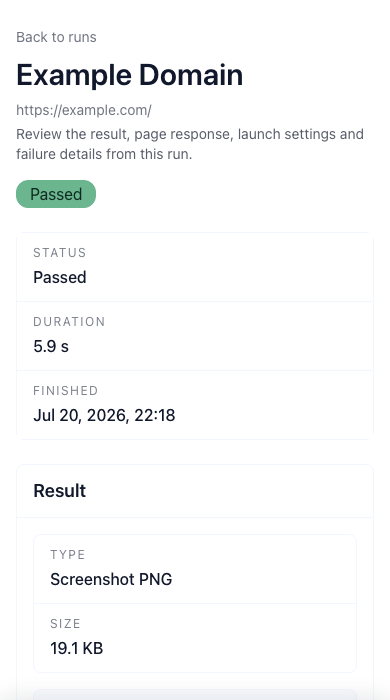
The demo above captured example.com as a 19.1 KB PNG in 5.9 seconds. Its status is Passed, but the review summary also shows 'No assertions' and '0 steps'. That run confirms the screenshot was captured. A pricing check needs its own assertions before the result can tell you whether the plan and price are still right.
When a visual result changes, compare the accepted baseline, current image and highlighted diff. Check the changed area and the assertion output, then record Accept, Reject or Ignore with an optional note. Do not promote a login wall, missing selector or partial render to the new baseline. Keep credentials in the request or saved Check Suite settings, not URLs or screenshots. This browser result supports uptime, analytics, accessibility and end-to-end checks but does not replace them.
Continue from the same workflow
Browse RenderLog guides
Open the practical guide hub for no-code tests, visual review and API output.
Guide: how to monitor website changes
A practical starting point for choosing pages, states and review ownership.
No-code website testing
Build page, form and UI-state checks with assertions, baselines and repeat runs.
Website screenshot API
Create one-off or automated screenshot and document outputs from a request.
Guide: monitor pricing pages
See how visual comparison and approved states fit a pricing-page review.
Guide: review visual diffs
Use baselines, run logs and alerts without turning every screenshot into noise.
Guide: schedule page checks
Choose a cadence when a recurring review already has a clear owner.
Start with one page the team already reviews
Save its rendered state, add one assertion tied to the risk and decide who reviews a change. Add more pages after the first check has a clear owner and response.